Friday, June 17, 2016

Making Templates in Google Sheets

I was asked to create a google sheet template that every person in a department could edit.  In speaking with the group, one of the major concerns was formatting. Different columns required different things:

  • Underline the name column
  • Monetary Values needed to be monetary values
  • Dates needed to be MM/DD/YYYY - which not everybody does.
  • Some columns were date ranges (combine start and end date).
The major issue with the spreadsheet was that the formatting was an issue.  These documents are created every 2 weeks by a group of 15 people and they are made public record.  Formatting and professional look is important.  Here are some things that I was able to do to make their life easier in creating this.

Conditional Formatting

In google sheets, if you highlight a group of cells and select underline, bold, italics, etc. it will apply that feature to current text.  What if there is no text yet?  The setting does not stay with the cell.  This is where conditional formatting comes in.

I have used this for changing the cells colors when a certain condition is met.  For this, the condition was "cell not empty."

Highlight the cells that you wish the formatting to apply and click Format > Conditional Formatting.

In the box on the right, select the green box near the bottom that says default and change to custom.


You can customize the color of the cell and font, the look of the font (Bold, Underline, Italic, Strike-through).

Not something for this example, but change the condition (Format cells if ...) to something else.  You can do some pretty cool stuff with it.

Number Settings

Highlight the group of cells that you wish to apply a standard number format.  Select the number format option [123].

For me the format was a date, MM/DD/YYYY.  The option to the right doe not quite work. So I chose "More Formats" at the bottom.  From here you can customize the date to have a leading zeroes on the month and day.  This works for me.

Now that I have applied that to the cells, the format will stick.  Type in:
  • Aug 2 = 08/02/2016
  • 8/2 = 08/02/2016
  • August 2 = 08/02/2016
I applied the same principal to monetary values as well.

Making Date Ranges

Dates are amazing, but you cannot concatenate (combine them as text with other dates to have pretty date ranges.  Maybe not the biggest deal to some, but I am slightly AR when it comes to that stuff.

First - changing a date to text.  You can do this with the text formula (yeah, I know, go figure). If the date is in A1, then the formula would look like this =text(A1, "MM/DD/YYYY") or whatever format you would like the date to be.  Just make sure it is in the quotes.

Second - to concatenate (combine things in different cells) you use the "&" sign.


save image
Putting it together - you can see in the picture above that I have the text formula 2 times.  After the first one you see & which means I am joining that with something else.  The quotes and dash ("-") is there because I want a dash between the 2 dates.  The second & is because I then would like to add the second date to the cell.  Here is the final product.
save image

If I change the dates in cell A2 or B2, then the date range will change as well.

Protected Ranges
save image
One other suggestion I have for you is to protect sheets or ranges.  If there is a range that you would like to protect, highlight the cells and find Protected sheets and ranges in the Data menu.  Protecting a range or a sheet means that it is uneditable.

Not everybody understands spreadsheets.  Usually because there is so much that you can do with them and people are afraid of them.  Save yourself the frustration and lock the cells that you would like others to leave alone.

Conclusion

I know there are so many things that you can do and I am just scratching the surface.  The conditional formatting was not the first thing that I tried to format text in the template, so I figured I would share that.

For more comprehensive educational uses of Spreadsheets in education, I would consult Alice Keeler's Blog.  For more information on Spreadsheets in general, try GCFLearnfree or Mr. Excel.

Wednesday, June 1, 2016

PD: What are you trying to develop?

Professional Development (PD) is a tricky beast.  If you have never taught adults, then it can be daunting.  Most adults who have not, think that it is something magically different.  As if turning a certain age means that you have changed the way that you learn.  In some cases, it means teachers are more close minded to the concept, or simply that they have a life outside of school and they want to get to it.  Regardless of how you word it, these excuses sound a lot like the things that we hear from our students.

When it comes to how to train teachers, some will claim that they just want you to tell them flat out and let them figure it out, some want to learn how you are teaching it, some want to complain about the fact that the sun rose today and but there is still a dark spot following them around (OK Peter Pan, its a shadow), and some say that you should give them a handout and let them get to work.  I could use the same words to describe most of the high school classes that I have taught.

You may think that I am cynical or that I have a negative view of teachers.  On the contrary, I find them to be the most amazing and patient group of people.  We just have a different scale of thought.  I am currently a district administrator.  I would be told I am on the dark side.  I am in charge of directing the vision of the district through educational technology.  I am trying to shift instruction in the district to be more inclusive, more differentiated, more personalized, and increase the quality of technology integration in the class.  That is my world.  To do this I need to help develop 2000 teachers and get them to experience something new.  Reason being, we tend to teach the way that we were taught.  The way that we were taught 20 and 30 years ago was not with a whole lot of technology, maker-spaces, coding, and programming.

Teachers live in another world.  Their classroom.  Need I say more, it is a huge job.  An important job.  I would say the most important job up there with police, firefighters, and others that protect us so we feel safe to learn.

I recognize the job is huge. So much so that I am like room service for amazing PD.  I bring new information to you, I model great instruction, I show how what teachers are doing connects to what others are doing in other schools.

Now you know my context.

So, if you are a PD leader or attending a PD, open your mindset and ask yourself what are you trying to develop.

Is the goal of the PD to make sure that teachers can add a link to a google doc, that they can turn something in through classroom, or share a youtube playlist?  It might be, but I hope it isn't.  That will have you banging your head against a wall all day long.  You are probably trying to cover the wrong thing in your training, and too much of it.

Is your goal to model teaching strategies by engaging them in something, perhaps a technology tool?  Cover a small thing.  Something that takes no more than 3 minutes to tell a single person.  Isn't that less productive, what if the training is 1 hour, what do I do for 57 minutes?  Don't flat out tell them. Engage teachers in a learning experience.  Have them collaborate, assess their learning throughout the collaboration, get them sharing.  Teach like an innovator who expects their students to take a small, but important thing and make something huge with it. Have teachers try out the tool.  Inspire teachers to create.  We expect our students to perform at a higher DOK level.  Model that for your teachers.  Give them the experience of doing so, some not in a content or realm they are comfortable.  Make sure they are not on their email or grading papers. Treat them like professionals that you are developing, but expect professionals.

Why?

I heard a teacher-leader ask this question the other day.  Doesn't that mean that you are going to cover less?  Less of what, I replied.  Our district vision deals with student learning, rigor, and college and career readiness. Does a teacher's use of youtube or google docs complete these goals. Maybe, it depends on how they are implemented by teachers.  I feel PD should lead to a change in teaching and I am sick of PD that tells and does not show.  There is nothing less powerful than telling somebody how to do something and contradicting it with every action taken in telling them.

As a Director of EdTech my goal is to improve student learning by engaging students in rigorous activities and content, and increasing their love of learning so they are ready to work through their college and career in something they love.  I am not in front of the kids as much any more, except for when the teachers tell me "that will not work with my kids, in my class."  Then I ask them to do a lesson study, in their class, with their kids.  Not to show them up, but to show them rather than tell them.

So you might cover fewer tools, but you have surpassed what you cover in modelling teaching practice.  If we are expecting it of our teachers, then they should expect it of us. In the end, I would like to see all PD leaders modelling the best strategies.  At your next PD, when done with the training, after you have assessed your teachers on their learning through some type of performance task, discussion, or activity ask them to reflect on how you taught them (your pedagogy, your management, and your style).  Let them know that this is more important to you than whether or not they learned the tool.  If the teachers forget how to use youtube, they can google it and watch a video on how to create and share a playlist.

As PD leaders we have other responsibilities, but the main responsibility we have is to our students.  We do not teach 5 or 6 classes per day, 5 days a week.  We teach several PDs per year and do a lot of administrative stuff in between.  Save time to create kick-ass trainings because if we expect greatness from our teachers then we should be able to deliver that ourselves.  Knowing how hard that is might put us in check the next time we want to bombard them with new tools.

Tuesday, May 31, 2016

Part 6: Creating an Educational Ecosystem: Equilibrium

As I think back on the idea that a classroom is like an ecosystem, I realize that I am writing words that are static about a system that can be anything but static.  The beauty of an ecosystem is that organisms, environment, and energy naturally come to a state of equilibrium.  Many people think that an equilibrium is a state where everything stops.  In reality, it is where changes happen in all directions at the same speed.  It is a dynamic time of change where is appears that there is no change.  Like with your students, the most learning tends to happen when they have no idea that they are actually learning. Systems naturally reach an equilibrium as part of their design.


Most learning tends to happen when students have no idea that they are actually learning

The magic of equilibrium is that a system is stable because it is moving.  A glass of water appears still, but the molecules on the surface are evaporating and condensing at the same rate.  That motion keeps the water stable.  When a stress is placed on a system, the movement allows the system to react to the stress.  Drought, storms, wind, and erosion all affect an ecosystem, but the dynamic equilibrium adjusts to keep the system stable.  When there is an action, there is a reaction.  


Your classroom should be in an equilibrium.  That is to say that your classroom will shift to account for the structure that best supports your lesson and objective.  When you stress your class with a project, move it with a lab, or shake it with assessment and data driven methods that your classroom should be malleable enough to adjust to the changing needs of your class.  Not every activity you do will be collaborative (nor should it), not every activity will be alone (nor should it) the learning objective should determine the pedagogy and that, in turn, should affect how your classroom is spaced.  If your layout does not support your pedagogy and learning objective, then your ecosystem is not in equilibrium.

Your classroom should be in an equilibrium.

As you can see, I am a science guy.  When I think of the classroom I think of an ecosystem, equilibrium, energy, environment, and organisms.  However you think of your classroom, I hope that it is as something that lives.  Your classroom is more than seats, a floor, and four walls.  It is a tool to help you drive instruction, support learning, and engage students.  It is as important as the devices in their hands, their peers in the classroom, and the content to which you guide them.  Utilize the tool, don’t fight your classroom.

Sunday, May 29, 2016

SAMR and TPACK explained

Why are there 2 theories that essentially point to the same thing?  What do they mean?  Just frickin break it down for me.  Sound like you, read on.

I have found that my idea of SAMR and TPACK is very simple and that it makes sense to most teachers.  what it requires is thinking like a teacher, got that... If so, you should be fine.  In simple, you plan lessons with TPACK, you reflect on student performance with SAMR

Planning your lesson with TPACK

Teachers plan lessons, they think of the thing that they are going to teach and how they are going to teach it.  NOTE: teaching does not mean talking, teaching means there is learning.

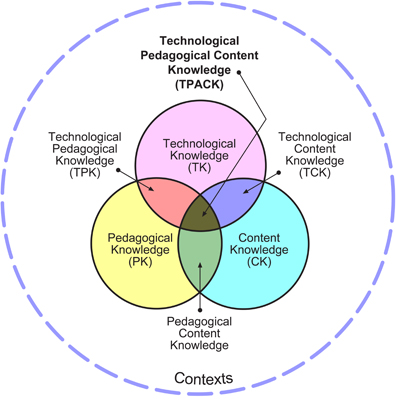
TPACK - Technology, Pedagogy, And Content Knowledge (yep, its an acronym)
Technology - the things that you and the students are going to use in the lesson to support learning.
Pedagogy - what are your methods, how are students grouped.  (teacher stuff)
- think, pair, share and stuff like that.
Content Knowledge - the thing that you want the kids to learn (content objective if you want to be all hoity-toity about it)

So when you make a lesson, you teach some stuff, using some methods.  With TPACK the idea is that you teach some stuff, using some methods, and you have technology to support it.
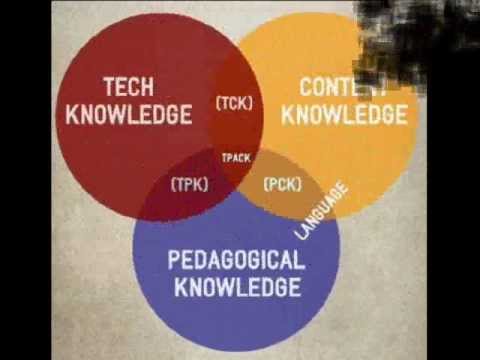
It is a 3 circle venn diagram.  The difference between this model and "normal teaching" (which is just the bottom 2 circles) is that you integrate technology into a lesson to raise the level of the lesson.  Understand that it does not always mean that the lesson will be better.  That is for you, the teacher, to determine in the context (dotted blue circle) of your class.

Reflecting on the lesson with SAMR
I can only hope that as a teacher you reflect on your lessons.  If not formally, then informally as you are driving home, prepping the lesson for next year, or whatever.  The idea is that you think about what the students did, how they performed, how engaged they were with the topic, and did they learn.  In thinking about what students did during the lesson/activity, that is where you use SAMR.

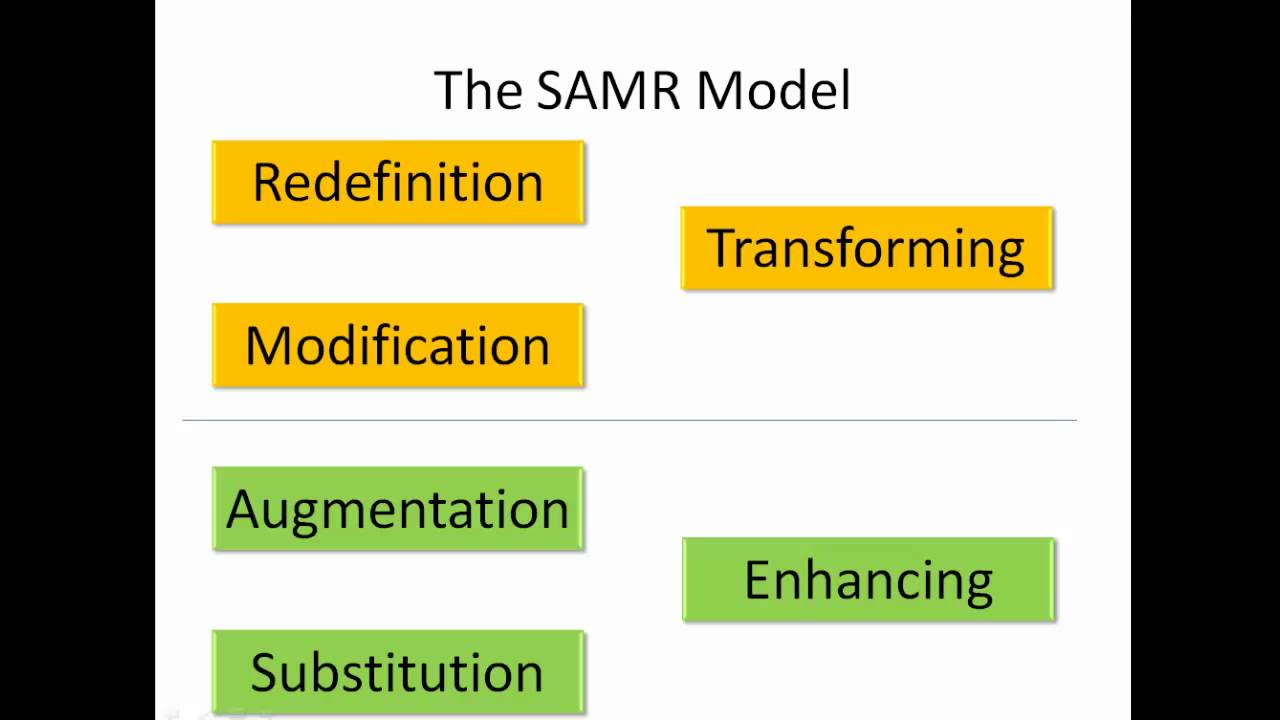
Ask yourself with a lesson, could the students have done this without the technology?

Yes - then you just substituted the use of tech for something else.
Kinda - then you augmented the lesson with the use of technology, made it different in some way.
Not really - then you modified the lesson.  Students could have done some, but it would be very difficult to get similar products.
Heck No - then you transformed the lesson to something that would be impossible without technology.

I know what you are thinking... why not use my acronym YKNH?  Not as catchy.  Whatever.

Now, just because you can do it, does not mean that you should.  There are times when redefining your lessons are what students need to learn the material.  There are other times when that is not what they need and you are just creating a long project that is drawn out and unengaging.  That is up to you to decide with your teacher powers.

The point of TPACK is to help you plan lessons that integrate technology more.  The point of SAMR is for you to refine you technology integration and get you to think about how to make your activities and lessons more transformative and engage your students in activities that require higher orders of thinking and deeper technology integration to create a product.

hope this helps.

Saturday, May 28, 2016

The most innovative tools on the internet

I am a fan of using the simplest tools to do a multitude of things.  It has lead me to find what I consider to be the most innovative tools on the internet.  I can use these tools every day for the next year and use them a different way every single day.  What is better, I do not have to learn 1000 different tools to do what I want to do.  I can work in a comfort zone and learn some great, in-depth things about these tools.

We need to model and inspire creativity to develop divergent thinking to get students to have an entrepreneurial spirit.

I have read blog posts and the horizon report on where technology is going and the most transformational tools on the internet.  I see augmented reality, but my students do not have the app on the chromebooks.  Google cardboard and expedition, but cardboard does not hold anything other than a cell phone (I don't have 40 of them).  Blended and mobile learning, but in my area I do not wish to create inequity for the students without devices, access to the device, or internet at home.  Digital textbooks, great resource as long as it is used correctly.  Social Media, blocked in my district.

I disagree with the idea that these are up and coming technology tools for the classroom.  I think that the up and coming technology is the tech that already exists.  The innovation comes with the application.  We are teaching the common core standards with a focus on collaboration, communication, critical thinking, and creativity.  We need to model and inspire creativity to develop divergent thinking to get students to have an entrepreneurial spirit.  An entrepreneur is the ultimate innovator, like a divergent thinker is the ultimate creative genius.

So what are the most innovative tools on the internet? Spreadsheet and a Slide

If a spreadsheet is just a place for numbers in boxes and a slide is the thing that holds words and pictures for your students to write and draw as you talk, then watch the video above.  Spreadsheets can be used for gradebooks, art, mapping workflow, collaborating, organizing, communicating and holding conversations, curating resources, posting student generated work, creating rubrics, document creation, databases, and the list goes on and on.  Slides can be used as video backgrounds, newspaper templates, newsletters, collages, children's books, collaborative spaces, class-wide blogging, sharing pictures, choose your own adventure stories, and many more.

Spreadsheets and Slides are the most expandable programs.  They have the lowest bottom floor of any internet tool available (maybe a doc), but they also have the largest potential for creativity and creation.

What does this mean for you as a teacher?

To integrate technology, you do not need to find the newest, best tool out there.  You need to use the one that you most likely already know how to use and apply it in a different way.  Think divergently.  If you do want another tool, use one that integrates with these to make your life easier.

What does this mean for you as a admin or leader of PD?

If you know EdTech you may have heard the terms SAMR and TPACK.  

I will go into those at a later post, but they generally talk about transforming activities, lessons, and student generated products with technology.  Teachers can transform their classes with simple technology.

Technology PD is simply professional development on teaching practice.  I am an advocate for the belief that it is not great teaching unless there is support for language learners, differentiation for fast and slow learners, and technology.  If your technology PD is on an expandable program like spreadsheets or slides, you are able to differentiate your PD for those who have a discomfort with clicking and making mistakes, requiring more attention while also providing an extension for those who may know the program but have only used it in a single facet.

Narrow the tools you teach, expand your influence to apprehensive teachers, get more teachers to integrate technology and transform their classrooms.